Devicetree
Scope and purpose
The Devicetree (DT), is a data structure and language for describing hardware (inter dependencies between devices). More specifically, it is a hardware description that is readable by an operating system so that the operating system doesn’t need to hard code details of the machine.
For general devicetree information, documentation is available:
Usually, the DT representation is created and passed to the kernel as a binary blob (dtb). At runtime the kernel uses a library to parse this blob to look up the hardware informations. Like this, a kernel can be independant of hardware description and same kenel can be compatible with several boards, SoC…
However, this way has 2 disadvantages for small systems:
Increase embedded image size, which integrate parsing library and the blob.
Increase boot time: each device looks up its information from the blob
In 2016, Zephyr offered an alternative for small systems, which uses the advantage of DT description whitout the need to parse a blob. This devicetree is based on this alternative.
Concept
There are two types of devicetree input files: devicetree sources (dts, dtsi) and devicetree bindings (yaml). The sources contain the devicetree itself. The bindings describe its contents, including data types. The build system uses devicetree sources and bindings to produce a generated C header.
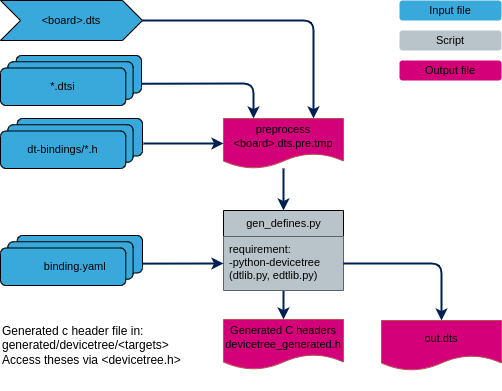
To simplify, gen_defines.py script creates for each information a define with specific name and its value.
/ {
     first_node {
             second_node_label: second_node@10000000 {
                     compatible = "foo,foo-compatible";
                     foo-val = <3>;
                     status = "okay";
             };
     };
  };
Example of define’s generated in devicetree_generated.h
#define DT_N_S_first_node_S_second_node_10000000_PATH "/first_node/second_node@10000000"
#define DT_N_S_first_node_S_second_node_10000000_P_compatible {"foo,foo-compatible"}
#define DT_N_S_first_node_S_second_node_10000000_P_foo_val 3
#define DT_N_S_first_node_S_second_node_10000000_STATUS_okay 1
The name is built from the devicetree path and key word like (list is not exhaustive):
DT_Nheader for devicetree nodeSfor/Pfor property
To easily exploit the generated define, some macros are available in “devicetree.h”
or framework include files (clk.h..). All macro names start with DT_.
Example:
// return node's label property value
#define DT_LABEL(node_id)
// return 1 if the node has the property, 0 otherwise.
#define DT_NODE_HAS_PROP(node_id, prop)
// return a representation of the property's value
#define DT_PROP(node_id, prop)
// return node's register block address
#define DT_REG_ADDR(node_id)
How to add devicetree support
To add devicetree support on your target, include:
the devicetree config file
config.cmakewhich defines the default devicetree variables.the devicetree cmake file
gen_dt.cmakeand call theadd_devicetree_target()function on an existing CMake target.
This function generates the devicetree_generated.h header for the target,
creates an INTERFACE library dt_<TARGET>_header exposing the include
directories, and a STATIC library dt_<TARGET>_libs where devicetree
based drivers (see How to add device) can be added with
target_sources(). Both libraries are automatically linked to
<TARGET>, and a custom target dt_<TARGET>_gen_h is created to drive
the header generation.
add_devicetree_target() arguments:
Argument |
Required |
Description |
|---|---|---|
|
Yes |
Name of an existing CMake target on which devicetree support is
added. It is used as a prefix to name every generated file, target
and library ( |
|
Yes |
File name of the board devicetree source (dts) to build, e.g.
|
|
No |
List of extra directories to search for devicetree sources (dts, dtsi) and includes, in addition to the default ones already known by the build system (SoC, boards, extension and include directories). |
|
No |
List of extra flags forwarded to the devicetree compiler frontend
( |
|
No |
List of extra flags forwarded to the C preprocessor used to
preprocess the devicetree sources, e.g. extra |
Include devicetree config:
# set devicetree config
if (EXISTS ${STM_DEVICETREE_DIR}/config.cmake)
    include(${STM_DEVICETREE_DIR}/config.cmake)
endif()
Add devicetree on target:
# include devicetree cmake file in your project
include(${DEVICETREE_DIR}/gen_dt.cmake)

# add devicetree support to the "tfm_s" target
add_devicetree_target(
    TARGET tfm_s
    DTS_BOARD ${DTS_BOARD_S}
    DTS_DIR
        ${MY_DTS_DIR}/devicetree
    DTC_FLAGS
        -Wno-unique_unit_address
    EXTRA_CPPFLAGS
        -DMY_BOARD_VARIANT
)

# add devicetree based drivers to the generated static library
target_sources(dt_tfm_s_libs
    PRIVATE
        ${MY_DRIVER_PATH}/foo.c
)
How to add device
In this section we would to add and enable device using a new driver that requires some ressources (reg, int value).
Devicetree (dts) and bindings (yaml)
Files location:
The devicetree source (dts, dtsi):
SoC:
devicetree/dts/soc/<soc-family>/Boards:
devicetree/dts/boards/<board-name>/
/* Node in a DTS file */
my-device@10000000 {
  compatible = "foo-company,my-device";
  reg = <0x10000000 0x400>;
  num-foos = <3>;
  status = "okay";
};
Bindings (yaml):
devicetree/bindings/<framework>/
description: my-device description

compatible: "foo-company,my-device"

include: [base.yaml]

properties:
   reg:
      required: true

   num-foos:
      type: int
      description: integer value
With the compatible field, the build system matches my-device node to its yaml file.
Yaml file allows checking the properties: (type, required) and generates defines adapted
to type.
Bindings can include other files, which can be used to share common property definitions between bindings.
Use the include: key for this. Its value is either a string or a list.
Drivers
// define compatible value, needed for DT_INST_XX macro
#define DT_DRV_COMPAT foo_company_my_device

// include generic device api and devicetree
#include <device.h>
#include <debug.h>

struct my_device_config {
     uintptr_t base;
     uint32_t num_foos;
};

struct my_device_data {
};

int my_device_init(const struct device *dev)
{
     const struct my_device_config *dev_cfg = dev_get_config(dev);

     IMSG("my property num-foos:%d", dev_cfg->num_foos);

     return 0;
}

#define MY_DEVICE_INIT(n)                                    \
                                                             \
static const struct my_device_config my_dev_cfg_##n = {      \
 .base = DT_INST_REG_ADDR(n),                                \
 .num_foos = DT_INST_PROP_OR(n, num_foos, 0),                \
};                                                           \
                                                             \
static struct my_device_data my_dev_data_##n = {             \
};                                                           \
                                                             \
DEVICE_DT_INST_DEFINE(n,                                     \
           &my_device_init,                                  \
           &my_dev_data_##n,                                 \
           &my_dev_cfg_##n,                                  \
           POST_CORE, 10,                                    \
           /*&fw_controller_api*/ NULL);

DT_INST_FOREACH_STATUS_OKAY(MY_DEVICE_INIT)
For each instances with compatible foo-company,my-device and status
okay a device structure is defined with:
A pointer to the device’s initialization function, which will be called during system initialization.
A private data structure by instance.
A config structure (constant) by instance.
The device’s initialization level (see Initlevel).
A framework API, if this controller is under a framework.
Note
Tips to debug this part:
Check devicetree source (dts) preprocessing in
<BUILD_PATH>/generated/devicetree/<tfm_s|tfm_ns|bl2>files*.dts.pre.tmporout.dtsCheck if
devicetree_generated.hcontains your device and its propertiesPreprocess your C file to check that
DT_INST_*macros are expanded with the expected devicetree values in your device instance.
# From the build directory, find the preprocessing rule generated for your driver source file
grep -r 'foo.i:' *
# platform/target/CMakeFiles/dt_tfm_s_libs.dir/build.make:platform/target/CMakeFiles/dt_tfm_s_libs.dir/__/common/stm32mp2xx/native_driver/src/foo.i: cmake_force

# Run the matching make rule.
make -f platform/target/CMakeFiles/dt_tfm_s_libs.dir/build.make platform/target/CMakeFiles/dt_tfm_s_libs.dir/__/common/stm32mp2xx/native_driver/src/foo.i
# Edit the foo.i generated
Copyright (c) 2026 STMicroelectronics. All rights reserved. SPDX-License-Identifier: BSD-3-Clause